How Payments for Hourly Contracts Work
Last updated: August 25, 2026
Payments for hourly work are generated from approved timesheets.
Before payment can be processed, your timesheet must complete the review process. For information about submitting timesheets, approval timelines, and returned timesheets, see Managing and Submitting Timesheets.
After your timesheet is approved
Approved payments enter a 5-day security review period before funds become available.
Tracking your payment
You can track your earnings and payment status from the Transactions page.
During the security review period:
Payments appear as Approved.
The expected availability date is displayed for each payment.
You can view a breakdown of earnings by contract.
Once the security review period is complete, your funds become available.
When you’ll be paid
The following example shows a typical payment timeline for an approved hourly timesheet. If your timesheet is returned for updates, the timeline will be extended until it is resubmitted and approved.
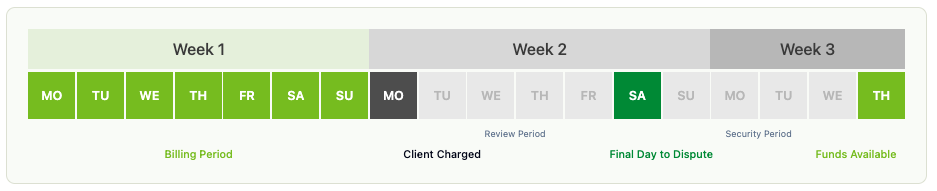
If you work hours between Monday and Sunday:
The billing period ends Sunday at 11:59 PM UTC.
Your timesheet is automatically submitted on Monday at 11:59 AM UTC.
Your client has until Saturday at 11:59 AM UTC to review the timesheet.
If approved, your payment enters a 5-day security review period.
Your payment is expected to become available the following Thursday.
Manual payments and bonuses
Clients can send manual payments, including bonuses, outside of the timesheet process.
Once processed, these payments enter the same 5-day security review period before becoming available.